I was listening to Lex Fridman’s conversation with Michael Levin on morphogenesis, intelligence, and the future of bio‑engineering. The talk moved fast. Sharp ideas. Clean hits. No wasted motion.
Then a detail on the desk caught my eye.
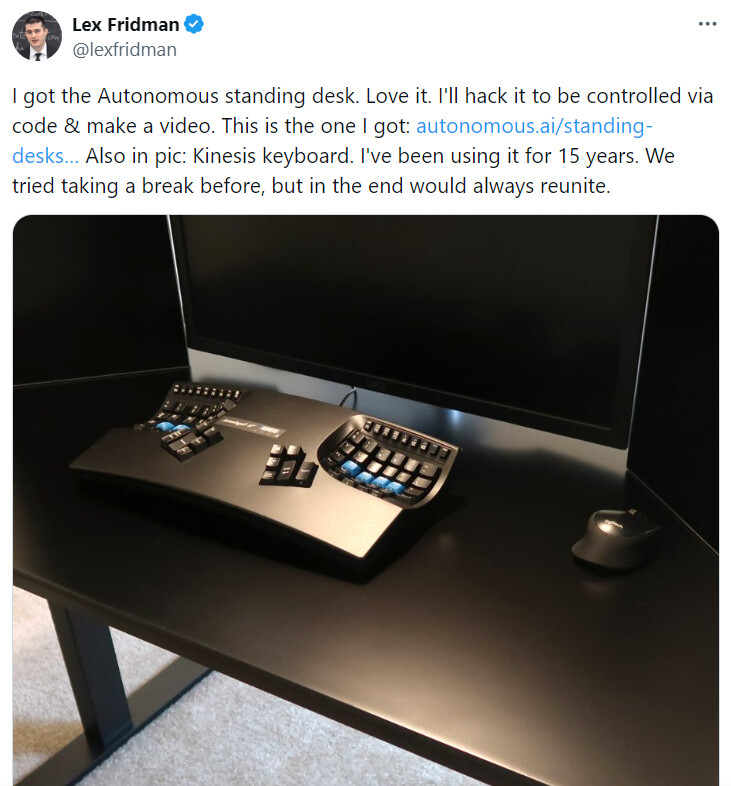
Lex plants a Kinesis Advantage in full view. Its split wells and blue thumb clusters sit there like a quiet declaration: long hours, serious focus, no compromise.
Next to it, the setup turns subtle. A Lenovo ThinkPad. You can spot the glowing red square on the lid and the TrackPoint rising from the keyboard like a small signal fire. Classic tool of someone who values reliability over flash.
A small moment, but it says plenty about the way he works.


He uses the external Kinesis because he really cares about ergonomics and comfort, and laptop keyboards are bad at both for heavy typing.
Key points:
-
The “bowl” keyboard is a Kinesis Advantage (or Advantage2)
- It has two concave “wells” for the keys, spaced at shoulder width, with modifiers under the thumbs instead of the pinkies. (Wikipedia)
-
Lex’s own stated reason: backspace under the thumb
- On his podcast with Guido van Rossum, he explains he uses a Kinesis because backspace is under the thumb instead of being a long reach for the right pinky on a normal keyboard.
- He says people don’t realize how much strain and awkward motion that pinky reach causes, and with the Kinesis he can hit backspace without moving his hands off home position. (PodScript)
-
Comfort & focus “ritual”
- In the same segment, he says he brings the Kinesis even on flights, pulls it out with his laptop, and has basically accepted being “the weirdo” who carries a big keyboard everywhere because it puts him in a comfortable, highly focused working mode. (PodScript)
-
Long‑term muscle memory
- He’s mentioned using a Kinesis keyboard for around 15 years. That’s a huge amount of muscle memory; swapping to a flat laptop board would feel slow and error‑prone. (X (formerly Twitter))
- He’s mentioned using a Kinesis keyboard for around 15 years. That’s a huge amount of muscle memory; swapping to a flat laptop board would feel slow and error‑prone. (X (formerly Twitter))
-
Laptop keyboard vs. Kinesis
- Laptop keyboards are flat, cramped, and force your wrists inward and your pinkies to do a lot of work.
- The Kinesis’ contoured wells and split layout are specifically designed to reduce wrist deviation and finger travel, especially for people who type or code for hours. (Wikipedia)
So the Lenovo is basically just the compute + screen. The Kinesis is “home base” for his hands: less strain, better accuracy, and a familiar, productivity‑maximizing setup that he drags around rather than suffer on a built‑in laptop keyboard.