We wer trying to move the cursor left on Far Manager’s command line, and the arrow keys kept moving the selection in the file panel. The shortcut we wanted was Ctrl+S. That sent us down a little rabbit hole.
Ctrl+S and Ctrl+D come from the same pattern as WordStar’s cursor diamond. On a QWERTY keyboard, E sits above S and D, and X sits below them. Borland’s Turbo Pascal editor used those keys too. Far keeps the left and right shortcuts and uses the up and down keys of the diamond to navigate command history.
| Shortcut | WordStar | Far Manager command line |
|---|---|---|
| Ctrl+E | Up one line | Previous command |
| Ctrl+S | Left one character | Left one character |
| Ctrl+D | Right one character | Right one character |
| Ctrl+X | Down one line | Next command |
- WordStar 4 manual
- Borland Turbo Pascal reference manual
- Far Manager command-line help
- Far Manager as an IDE
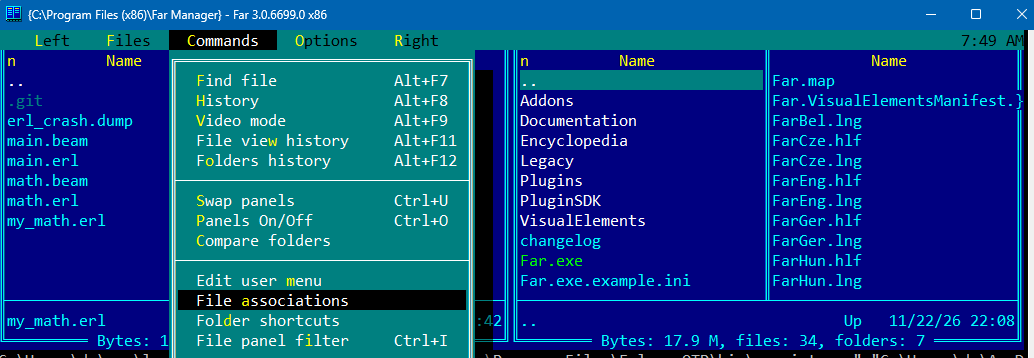
Tip: Use Commands > File Associations:
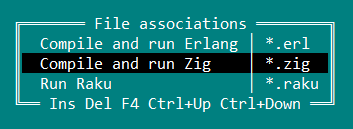
When you hit Enter on a certain extension…
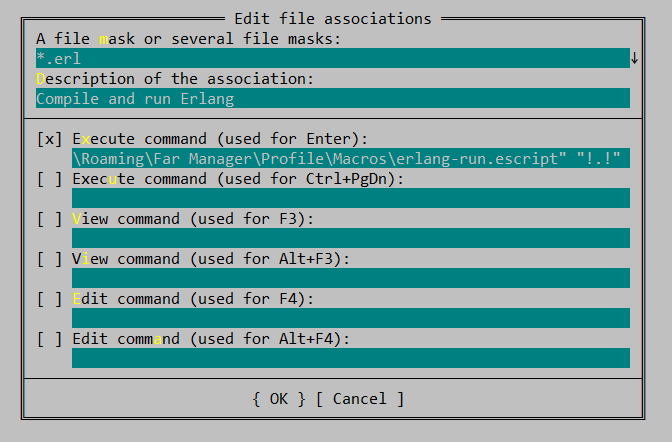
What is executed:
"C:\Program Files\Erlang OTP\bin\escript.exe" "C:\Users\de\AppData\Roaming\Far Manager\Profile\Macros\erlang-run.escript" "!.!"